Build smart custom forms
natively on your Webflow canvas.
Create multi-step wizards, conditional logic, digital signature pads, and direct Klaviyo, Mailchimp and HubSpot integrations. No slow iframes, no layout shift, and completely styled with your Webflow custom classes.
Approved by Webflow · Available on the Webflow MarketplaceBuilt for Webflow
Watch FormFlow build a multi-step form
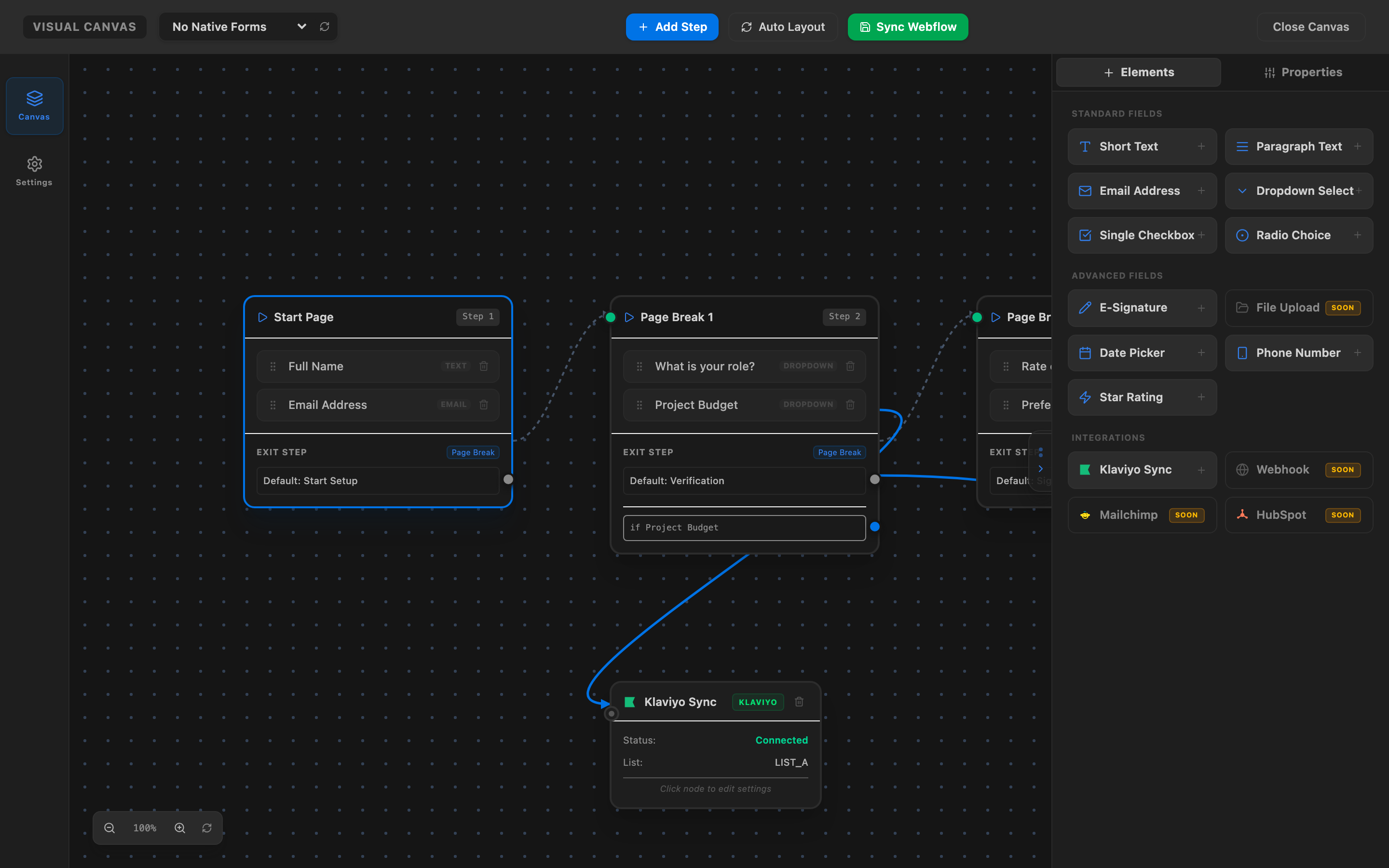
Unified Visual Flow Canvas
Organize form routes, setup advanced steps, and configure Klaviyo or webhook integrations inside a drag-and-drop visual builder.
Native Elements vs. Iframe Embeds
Stop embedding slow, unstyled third-party widgets that degrade your Lighthouse scores and damage user experiences.
Native Webflow Forms
- 0ms Layout Shift (CLS): Non-jarring transitions that preserve Google Core Web Vitals.
- Automatic Style Inheritance: Inherits your Webflow project's global typography, colors, and button classes instantly.
- 100% SEO Indexable: Search engine bots read and index all input fields, labels, and helper texts.
- High Performance: Pure vanilla JS runtime executing natively without loading nested frames.
- Complete Canvas Customization: Custom-style active and inactive states directly in the designer panels.
Iframe Form Embeds
- ✕Severe Layout Shifts: Jarring viewport jumps that trigger Google Lighthouse warnings.
- ✕Mismatched Brand Design: Rigid buttons, borders, and styles that feel disconnected from your layout.
- ✕Zero SEO Visibility: Input text and contents within inside iframe windows cannot be crawled by search engines.
- ✕Heavily Bloated Bundles: Downloads megabytes of unoptimized tracking and design scripts, slow to load.
- ✕Complex Mobile UX: Rigid iframe containers trigger scrollbars and layout cutoffs on mobile screens.
Advanced Components & Fields
Inject rich elements directly into your native forms. Fully styleable using standard Webflow layout and styling panels.
Digital Signatures
Capture legally binding hand-drawn signatures with desktop mouse or mobile touch inputs.
File Uploader
Let visitors attach files up to 10 MB, type-checked and linked to the form submission.
Date Picker
A clean calendar date picker that works the same on desktop and mobile.
Phone Mask
Formats US phone numbers as visitors type, so you receive clean, consistent data.
Dynamic Calculations
Calculate prices, totals or scores live from other fields (numbers and + − × ÷).
Step Validation
Each step is checked before visitors move on, with your own error messages and colors.
Smart Endings
Redirect to a page on your site or show a tailored success message based on answers.
Star Ratings
Clickable star ratings that store a simple number with the submission.
How it works
Build, style, and integrate in three straightforward steps.
Install the Webflow App
Install our app from the Webflow Marketplace and drop the Form Wrapper element onto your canvas in one click.
Style Natively on Canvas
Drag and drop native Webflow input fields or our advanced components inside the wrapper. Custom style them using native Webflow controls.
Integrate & Hit Publish
Branch form paths visually and connect outputs directly to Klaviyo, Mailchimp, HubSpot or an approved automation webhook. Hit publish and scripts are injected instantly using Registered Scripts.
Supercharge Native Webflow Forms
Everything you need to build high-converting, smart, and fully integrated forms directly inside the Webflow Designer.
Multi-Step Form Wizard
Break complex forms into beautiful multi-step wizards natively inside Webflow Designer. Customize page transitions and progress indicators easily.
Conditional Logic Router
Route users based on their inputs using advanced IF/THEN branching logic. Configure logical expressions without writing code.
Klaviyo, Mailchimp, HubSpot & Webhooks Sync
Connect your forms directly to Klaviyo lists, Mailchimp audiences, HubSpot CRM, or webhooks on Zapier, Make, n8n and other approved automation tools via visual canvas nodes. Seamless data flow without third-party middleware.
Seamless Script Injection
Automatically registers and injects form scripts using Webflow's native Registered Scripts API, keeping setup completely code-free.
Simple, Transparent Pricing
Unlimited form submissions, at a fraction of the cost.
Free
Try every feature on your staging site.
- All features on webflow.io staging
- Unlimited form submissions
- No credit card required
- Upgrade to go live on a custom domain
Starter
Perfect for small sites and portfolio projects.
- Unlimited form submissions
- Unlimited Webflow sites & forms
- Multi-step forms
- Conditional logic branching
- Direct Klaviyo Integration
Growth
For growing businesses and client projects.
- Unlimited form submissions
- Unlimited Webflow sites & forms
- Everything in Starter
- Custom validation messages
- Custom variables & Calculations
- File Uploads & Storage integration
- Direct Webhooks, Mailchimp & HubSpot Sync
Business
For agencies and high-traffic ecommerce sites.
- Unlimited form submissions
- Unlimited Webflow sites & forms
- Everything in Growth
- Priority Email & Loom Support
- High-performance API processing
Frequently Asked Questions
Have questions? We have answers.
Is there a free plan?
Do I need a paid Webflow site plan to use FormFlow?
Are there limits on monthly form submissions?
Can I connect form outputs to multiple services simultaneously?
Do you charge transactional or form processing fees?
Start building native forms in Webflow today.
Install the designer app, connect your stack, and style everything natively on your canvas.